
- 首页
- About
- Products
- Download
- Support
- Applications
CNC Development Manual
How Teach programs reference recipe parameters
Download the bilingual offline manual (ZIP, 8.7 MB; original-resolution screenshots included)
The same taught program may need different values for different jobs. For example, one workpiece needs a 1.25-second wait and another needs a 2.5-second wait. A recipe can hold the waiting time, while the generated program refers to that recipe entry.
This lesson uses the existing Delay instruction to generate one fixed delay and one recipe-based delay. Start with the operation and its result, then follow the tables, parameters and original scripts. The page, buttons and generation scripts all belong to the standard configuration.
1. Find the recipe table and instruction settings
Open Teach on the main screen, select Recipe on the left, and select Delay on the right. The left side holds reusable recipe data; the right side determines how the current instruction uses that data.
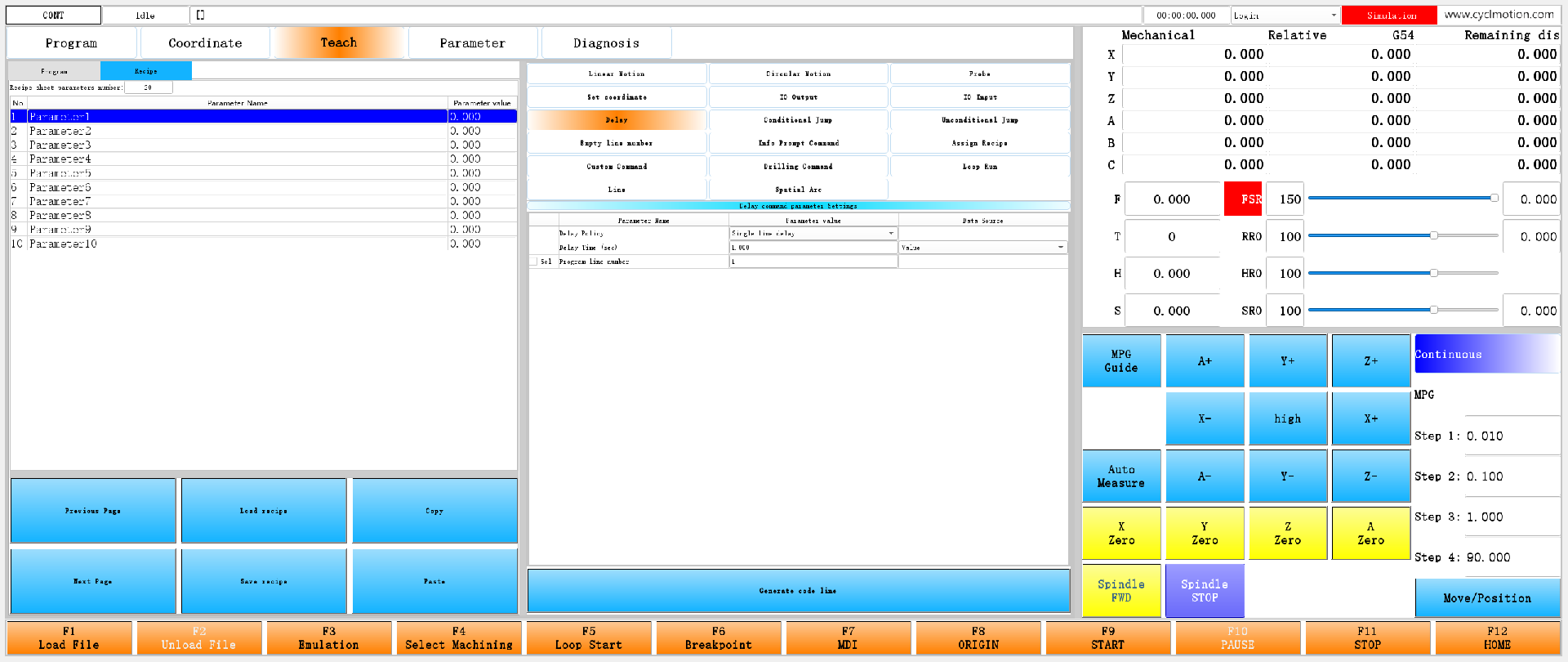
Click the screenshot to enlarge it. Full-resolution screenshots are included in the offline package.
Use Single line delay throughout this lesson. Leave Sel beside Program line number unchecked, so the generated code has no N word. The other delay policies have different purposes.
The steps below change the recipe and create two records in a practice copy. Save the existing taught program and recipe first, then start with an empty program. Do not reduce the size of a recipe that still contains data used by another function.
2. Prepare two named recipe values
Enter
2in Recipe sheet parameters number: and press Enter. Fill in the names and values below, pressing Enter to confirm each input.Displayed row Parameter name Parameter value Program reference 1 Delay time 1.25 #1550.item[0]2 Alternate delay 0.75 #1550.item[1]
Click the screenshot to enlarge it. Full-resolution screenshots are included in the offline package.
Keep these three things separate:
- The name, “Delay time”, is stored in
#1550.itemtitle[0]for the operator to recognize. - The value, 1.25, is stored in
#1550.item[0]. Its unit in this example is seconds. - The index, 0, selects the first entry. Displayed row numbers begin at 1; program indices begin at 0.
The recipe table does not give every value a unit of seconds. For feed, position or another purpose, the instruction using the value determines its unit. Make that unit clear in the name or accompanying instructions.
3. Generate a fixed delay first
Set the instruction on the right as follows:
Setting Selection or input Delay Policy Single line delay Delay Time (sec) 1.25; press Enter Data Source Value Program line number Leave Sel unchecked 
Click the screenshot to enlarge it. Full-resolution screenshots are included in the offline package.
Switch the left side back to Program and press Generate code line. The result is:
G04P1250The number 1250 is fixed when this line is generated. The original script multiplies 1.25 seconds by 1000 and converts the result to an integer for the G04 P word. Editing the recipe later does not change the 1250 in this line.
4. Generate a delay that references the recipe
After generating the first record, the current position advances to the next record. Keep Single line delay selected. Change Data Source for the delay-time row to Recipe Parameter Index. The seconds input becomes a name selection; choose Delay time.

Click the screenshot to enlarge it. Full-resolution screenshots are included in the offline package.
The control displays a name, but the instruction's working parameter stores 0. This means “use recipe entry 1”, not “wait 0 seconds”. Explicitly select the intended entry after changing the data source; the previously entered seconds are not necessarily a valid index.
Press Generate code line again. The program table now contains:
G04P1250
G04PINT[#1550.item[0]*1000]
Click the screenshot to enlarge it. Full-resolution screenshots are included in the offline package.
The second line does not insert 1.25 directly into the code. It leaves the NC interpreter to read recipe entry 1, multiply it by 1000 and convert the result to an integer.
Data source What the instruction stores Generated code When P is determined Value 1.25 seconds G04P1250When the code is generated Recipe Parameter Index Index 0 G04PINT[#1550.item[0]*1000]When NC interprets this expression 5. Why one input row has two meanings
In
env/teach/teach.ui, selecting Delay sets#1500to 6. Theenv/teach/codeselectscript then loadsenv/teach/ui/teach_7.ui.In the standard configuration,
#1500.item[6]is 1513. This page therefore uses#1513for the working values and#1514for related selection flags and settings. The category index 6, page file number 7 and parameter number 1513 have different roles.The fields needed for this example are:
Field Purpose Fixed value Reference to recipe entry 1 #1513.item[0]Delay policy 0, Single line delay 0, Single line delay #1513.itemversion[1]Data source 0, Value 1, Recipe Parameter Index #1513.item[1]Input for this row 1.25 seconds Index 0 #1550.item[0]Actual value of recipe entry 1 Not used by this fixed line 1.25 seconds #1514.item[2]Include an N word Unchecked Unchecked The table's data-source column uses this original attribute. For the delay-time row,
%%is 1:-T4(#[#1500.item[#1500]].itemversion%%<<#1104itemtitle25<<#1104itemtitle26)The first part specifies where the selection is stored. The other two parts supply Value and Recipe Parameter Index. Selecting the first writes 0; selecting the second writes 1.
The recipe candidate in the value column uses:
-T4(#[#1500.item[#1500]].item%%<<#1550)The first part stores the selection, which is
#1513.item[1]here. The second part,#1550, supplies the name list. The control takes names from#1550.itemtitle[...]and writes the selected index into the first part. It does not copy the selected recipe value into that field.Changing the data source also invokes the original event:
-A:(comboBoxChanged:/env/teach/ui/refresh7[0])The complete
refresh7script is:widgetFunc["QTableWidget","codeParamTable7","refresh",""]This rebuilds the table cells according to their conditions, allowing the numeric input to become a name selection. The complete candidate and condition rules are explained in the Teach tables lesson.
6. How the original script generates both forms
Generate code line runs
env/teach/addcode. It first sets two indirect parameter numbers:#11=#1500.item[#1500] #12=#1500.item[#1500]+1Here,
#11=1513and#12=1514. Therefore,^11.item[1]accesses#1513.item[1], and^12.item[2]accesses#1514.item[2].The N7 branch of
addcodethen callsenv/teach/pause. Its complete original content is shown below for comparison. The standard button already calls it; no new or replacement file is needed:#1551.itemversion[#1551]=7 #1551.itemtitle[#1551]="A"+^11.item[0] #1551.itemtitle[#1551]=#1551.itemtitle[#1551]+"B"+^11.itemversion[1] #1551.itemtitle[#1551]=#1551.itemtitle[#1551]+"C"+^11.item[1] #1551.itemtitle[#1551]=#1551.itemtitle[#1551]+"D"+^12.item[2] #1551.itemtitle[#1551]=#1551.itemtitle[#1551]+"E"+^11.item[2] #1558.item[0]="" #1558.item[2]="" IF^12.item[2]==1THEN#1558.item[0]="N"+^11.item[2] IF^11.item[0]==1GOTO1 IF^11.itemversion[1]==1THEN#1558.item[2]="P"+"INT[#1550.item["+INT[^11.item[1]]+"]*1000]" IF^11.itemversion[1]==0THEN#1558.item[2]="P"+INT[^11.item[1]*1000] N1 IF^11.item[0]==0THEN#1558.item[1]="G04" IF^11.item[0]==1THEN#1558.item[1]="#1513=#9990.channel" IF^11.item[0]==2THEN#1558.item[1]="G104" #1551.item[#1551]=#1558.item[0]+#1558.item[1]+#1558.item[2] #1551.itemdesc[#1551]=#1551.item[#1551] #1551=#1551+1 #1551.channel=FIX[#1551/10] widgetFunc["SysFunc","0","parser","/env/teach/parsenode"]Focus first on the two data-source branches:
- With source 0, the configuration script evaluates
INT[^11.item[1]*1000]and formsP1250. - With source 1, the quoted
INT[#1550.item[and]*1000]are text to put into the NC file. Only the selected index is converted to integer text between them. Index 0 therefore producesPINT[#1550.item[0]*1000].
Quotation marks determine whether the script calculates now or writes an expression for the NC interpreter. If a customization reads the recipe value first and inserts the resulting number, it changes the reference into a value fixed at generation time.
#1558temporarily holds the line number, instruction and argument parts.#1551.item[current index]stores the final code;.itemdesc[...]supplies the program-table text.The original script also contains timestamp and paragraph-delay branches. Their code differs; do not apply this lesson's seconds-reference explanation directly to the timestamp policy.
7. Selecting a record restores its index
When generating code, the script also writes editable settings into
#1551.itemtitle[...]. The two records in this example contain:A0B0C1.250DfalseE1 A0B1C0.000DfalseE1Content following the marker Meaning A Delay policy; 0 means Single line delay B Data source; 0 means Value, 1 means Recipe Parameter Index C Input content: seconds or an index D Whether to include a program line number; unchecked is stored as false here E Entered program line number; no N word is generated while unchecked Read B and C together.
B0C1.250means 1.25 seconds;B1C0.000means recipe index 0.Selecting a record invokes the N7 branch of
env/teach/parsenode. These two original statements restore the data source and input:^11.itemversion[1]=#1551.itemtitle[#1551]/"B"*"C" ^11.item[1]=#1551.itemtitle[#1551]/"C"*"D"The first restores the source; the second restores the input content. The page then presents the corresponding input control. This operation does not restore the entire recipe table as it was when the record was generated.
8. What changes when only the recipe value changes
Open Recipe, change Delay time from 1.25 to 2.5 and press Enter. Leave Alternate delay at 0.75.

Click the screenshot to enlarge it. Full-resolution screenshots are included in the offline package.
Return to Program, select record 1 and then record 2. The right side still displays Recipe Parameter Index and Delay time, because the record stores index 0.
Click the screenshot to enlarge it. Full-resolution screenshots are included in the offline package.
Do not press Generate code line again for this step. Both recorded lines remain unchanged:

Click the screenshot to enlarge it. Full-resolution screenshots are included in the offline package.
Recipe entry 1 before interpreting the program again Fixed line G04P1250P expression in the reference line 1.25 1250 1250 2.5 1250 2500 This is the purpose of a recipe reference: keep the program structure and prepare different values before machining. Only a line retaining the reference reads the new recipe value. A fixed-number line does not follow the change.
Changing which entry is selected, for example from Delay time to Alternate delay, is different. It changes the instruction's working settings. Press Generate code line for the selected record again to change
[0]to[1], then use Load code again to update the machining file.Confirm the recipe before starting. NC interpretation and physical execution occur at different points in the process. Do not edit the recipe during machining and assume that the change must take effect immediately at the line currently being executed.
9. Why Load code does not include the recipe values
Press Load code. The standard
env/teach/codeGeneratescript writes the recorded code toenv/teach/doc/program.ncand displays it on the Program page: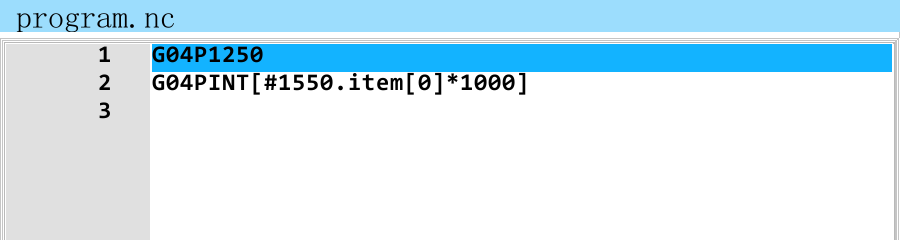
Click the screenshot to enlarge it. Full-resolution screenshots are included in the offline package.
The original output command is:
widgetFunc["systemParamToFile",1551,0,"/env/teach/doc/program.nc"]It writes the code text in
#1551.item[...]in order. It does not run each Teach generation script again or automatically prepend assignments for the#1550recipe values.The complete NC output for this example is therefore just these two lines:
G04P1250
G04PINT[#1550.item[0]*1000]
The reference line must be interpreted in this system with the matching
#1550data available. Copying the.ncfile to another runtime does not also transfer “Delay time = 2.5”.Distinguish the three kinds of saved content:
Operation and file Content saved Not automatically included here Save recipe, .formulaRecipe names, values and related parameter data from #1550Taught program records Save, .programCode records and editable settings from #1551The current complete recipe table Load code, program.ncRecorded NC text Recipe table, names and Teach editing data Load recipe runs
env/teach/openformula, reading the selected file into#1550. Save recipe runsenv/teach/saveformula, writing#1550to the selected file. Opening or saving a.programuses the separate parameter group 1551.When delivering a program or changing recipes, preserve the agreed entry positions. Checking names alone is insufficient: the code references
[0]; it does not search the recipe for the name “Delay time”. The next lesson, Teach records and files, covers the complete file operations.10. Handling changes to count, names and indices
This example has two entries, so the instruction provides a name list. The standard table uses this control when the recipe has no more than 20 entries. With more than 20, it changes to an integer index input. The conditions are explained in the Teach tables lesson.
Keep the following relationships in mind:
Change Effect on the existing reference Required action Value at the same position [0]still refers to that entry and reads its new value on the next interpretationConfirm before starting; save the recipe to retain it Name at the same position Code still references the original index Use the name for identification, while retaining the index agreement Selected entry in the instruction The working index changes Generate the current record again, then Load code Purpose or order of recipe entries The same index may now mean something else Check every program referencing that position Reduced recipe count A referenced entry may be removed Back up and check references first A different loaded recipe Existing code still uses the same indices Check count, positions, units and values In an integer input, 0 still means the first entry. A two-entry recipe has valid indices 0 and 1. Displayed row 2 is not index 2, and a negative number does not mean “not selected”.
11. Configuration techniques illustrated by this design
The original function connects operator-friendly names to program indices. Its data-source choice determines whether code contains a fixed value or a parameter reference. When reading another instruction, follow these steps:
- Locate the values. Here they are in
#1550.item[...], with names in.itemtitle[...]. - Identify what the instruction stores. Read both
.item[...]and the.itemversion[...]field that determines its meaning. - Follow the input changes. Check
-T,-Cand the refresh script called after a data-source change. - Read the generation script. A quoted expression is text for NC to interpret later; a calculation outside the quotes runs in the current script.
- Trace record recall and file contents. Instruction records, recipe data and NC output serve different purposes. Saving one does not save them all.
Use these checks for common symptoms:
Symptom What to check The delay stays fixed after editing the recipe Is the record still G04P1250? Was Value selected when it was generated?A recipe name is selected but the working value is 0 That is the first entry's index; the actual value is in #1550.item[0]Selecting another recipe entry does not change the program text Generate the current record again and reload the code Recalling a record no longer shows a seconds input A recipe-source record should display a name list or an integer index A recipe with the same name gives a different result elsewhere Check entry positions, current values, units and which recipe was loaded Delivering only the NC file gives unexpected values Its reference does not carry the recipe table; prepare the matching recipe data The files to follow are
env/teach/teach.ui,ui/teach_7.ui,ui/refresh7,codeselect,refreshFormulaParamTable,addcode,pause,parsenode,codeGenerate,saveformulaandopenformula. Understand how they cooperate in this example before applying the same method to other instructions that already support a recipe data source.Previous: Line and Spatial Arc · Next: Edit, save and reopen · Reading guide
在线咨询 - Download
